Contents
Tags
Qwen3.8-27B Does Not Need 17 GB. Here Is What It Actually Needs
Qwen3.8-27B arrived in August under Apache 2.0 with a real jump in coding scores — 73.0 on Terminal Bench 2.1 against 63.4 for Qwen3.6 27B, and 61.7 on SWE-bench Pro against 53.5. It is the most interesting locally-runnable model of the year so far, and the guidance around what it takes to run is a mess.
The number doing the most damage is 17 GB. It appears in enough places that people have concluded a 16 GB card is nearly enough. It is not, and the reason is worth understanding, because it applies to every model you will ever load.
A file size is not a memory requirement
The published Q4_K_M GGUF is about 17.11 GB. That figure is the weights on disk and nothing else. To run the model you also need:
- ▸The KV cache, which stores a key and value vector per token per layer and grows with your context — roughly 2.6 GB at an 8K context for a model this size.
- ▸About a gigabyte of runtime overhead for the CUDA or Metal context and activation buffers.
- ▸Whatever your desktop and drivers are already holding, which on a discrete card is around 10% of nameplate.
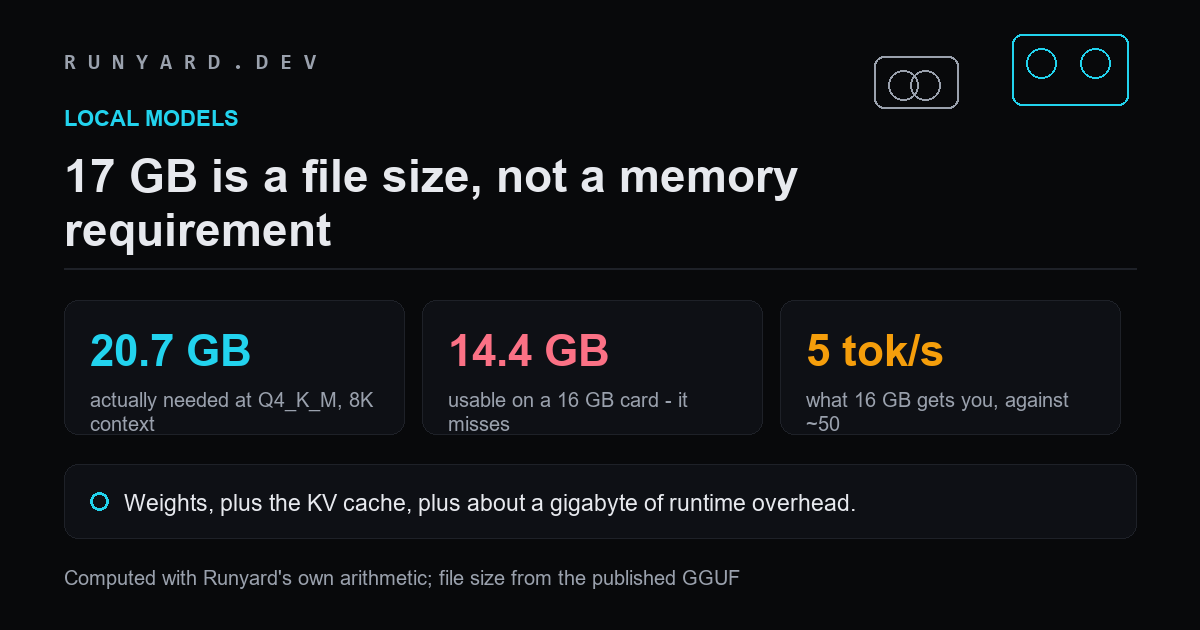
Add those and Q4_K_M needs roughly 20.7 GB resident at an 8K context. On a 16 GB card you have about 14.4 GB to work with. The model misses by more than 6 GB — not by a rounding error you can tune away.
Our own estimate for the weights is 15.19 GB at 4.5 bits per weight, against a published file of 17.11 GB. Real K-quant packing for this model lands above the nominal rate. Where the two disagree we have used the published file size, because that is the number you will actually download.
What happens if you try it on 16 GB anyway
It runs, and that is the trap. llama.cpp keeps what fits on the GPU and moves the rest to system RAM, so you get a working model at a speed that makes it useless. Reported results on 16 GB land at roughly 4.8 to 6.4 tokens per second on coding tasks.
That figure is not mysterious. Every token passes through every layer, so the effective rate is dominated by the slow side of the split. Dual-channel DDR5 at around 60 GB/s puts a 27B model at roughly 3 tokens per second on its own; a partial offload landing near 5 is exactly what the arithmetic predicts.
For comparison, the same model fully resident on a 24 GB card runs at roughly 49 to 53 tokens per second — an order of magnitude apart. Hands-on reports from a 4090 put it at 47 to 57, which is within a few percent of what our estimate gives. Fitting is not a preference.
What each quantisation actually needs
Computed at an 8K context, weights plus cache plus overhead:
- ▸Q8_0 — about 32.2 GB. Needs a 48 GB card or unified memory.
- ▸Q6_K — about 25.8 GB. Needs 32 GB.
- ▸Q5_K_M — about 22.8 GB. Needs 32 GB, or 24 GB at a short context.
- ▸Q4_K_M — about 20.7 GB using the published file. Fits 24 GB.
- ▸Q3_K_M — about 15.4 GB. Fits 16 GB, and this is where quality starts to visibly degrade.
So the honest answer to the hardware question: 24 GB is the entry point for this model at a quantisation worth using, and 32 GB is where it stops being tight. On 16 GB you are choosing between Q3_K_M and a model that runs at reading-aloud speed — and a strong 14B at Q5 will beat both.
Context is the part people forget
The cache grows with every token in the conversation, so a configuration that loads cleanly can run out of memory an hour later. If you intend to use a long context, budget for it at the start rather than discovering the ceiling mid-session.
One caveat on our own figures. Runyard's cache estimate is architecture-agnostic and scales with parameter count, which over-states it for models using grouped-query attention — and Qwen3.8 is one of them. Users report running 160K-token configurations on a single 24 GB card, which our estimate would call impossible. Treat our long-context numbers as a conservative ceiling and trust a real run over them.
Work out what the cache costs at your context length, on your card.
Open the KV Cache Calculator →The short version
- ▸17 GB is a file size, not a requirement. Add cache and overhead.
- ▸Q4_K_M needs about 20.7 GB resident at 8K context.
- ▸16 GB does not fit it. You will get 5 tokens per second, not 50.
- ▸24 GB is the entry point; 32 GB is comfortable.
- ▸A 14B model at Q5 on a 16 GB card beats a 27B at Q3 on the same card.
Tell it your card and it computes what fits, at every quantisation.
Check your own hardware →Tools
Find AI models that fit your exact hardware. Enter your specs and get a ranked list instantly.
Newsletter